The road trip journal
that writes itself.
Automatically record your drives, then turn the memorable ones into Journeys. Add photos and memory pins, revisit your route, and share your story as a poster.
Free to start · No account required · iOS 18+
One-time location and motion permissions enable automatic recording.
Built for every kind of drive
Your commute, your errands, your road trips — Drivio records them all. What you do with them is up to you.
Auto Trip Detection
No start or stop buttons. Drivio detects driving from GPS, motion, and Bluetooth/CarPlay signals — then records the route hands-free.
Daily Trip Insights
Your daily commute, weekend errands, and road trips — all auto-logged. A complete trip history so you can see where you go, when you go, and how often.
Build Your Journey
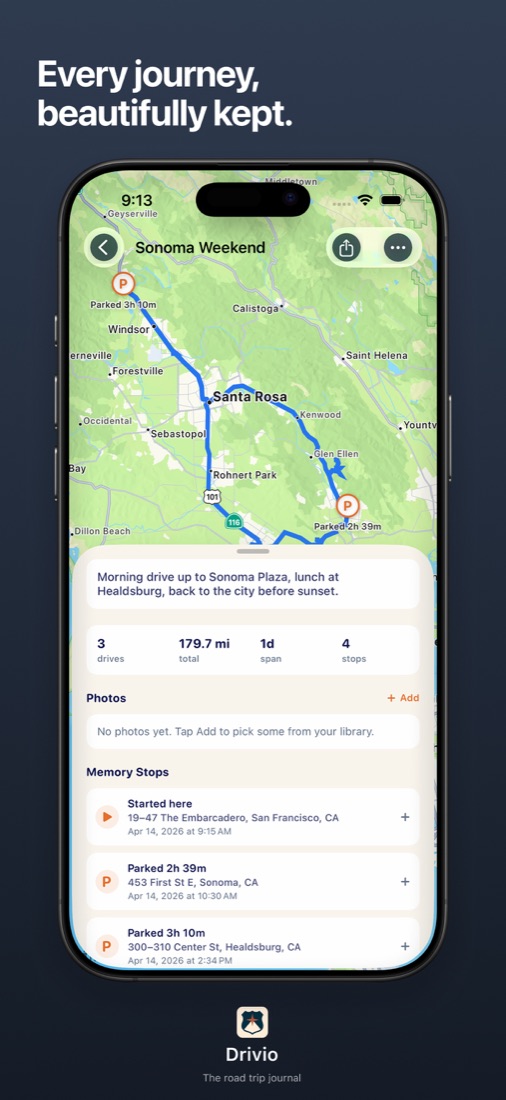
Pick a few memorable drives — your weekend to Big Sur, your road trip to the coast. Group them, drop memory pins along the route, and photos from your library auto-match by time and place.
Shareable Posters
Turn any journey into a stunning vertical poster — route map, stats, and photos — ready to post on Instagram or send to family.
Live Share
Let family follow your drive with optional Live Share. Choose a public link or private invitations, and manage active sessions in My Shares.
Private by Design
Your trip history is stored on your iPhone by default. Optional backup uses your iCloud Drive; Live Share uses Apple's CloudKit. No Drivio account required. Read how your data is handled.
Drive. Curate. Share.
Set up, then drive
Open Drivio once and enable Always Location and Motion & Fitness access. Then let automatic detection record your drives. Setup help.
Curate
Pick the drives that mattered — a road trip, a scenic detour, a memorable weekend. Group them into a Journey with photos and memory pins.
Share
Export your journey as a beautiful poster. Post it, print it, or keep it as your own private keepsake.
Free to use. Pro to share beautifully.
Record unlimited drives and build unlimited journeys for free. Upgrade when you want premium poster templates, iCloud backup, and live share.
- Unlimited auto trip recording
- Unlimited journey creation
- Photo auto-matching from your library
- Memory pins and route notes
- Basic shareable poster (with watermark)
- Single-device use
- Everything in Free
- Premium poster templates — no watermark
- Animated poster export (for Stories / Reels)
- Backup to your iCloud Drive
- Live Share — family and friends follow along in real time
- Priority support
Make your next drive easier to remember
Practical guides for recording, reviewing, and sharing a drive.
Set up automatic tracking
Check permissions and review a test drive, then build a daily commute log.
Add your road trip photos
Find missing images and attach notes to Memory Stops.
Share an ETA or a live drive
Choose the right sharing feature and review the privacy checklist.
Make your next road trip one to remember.
Download Drivio, complete the one-time permission setup, and head out. Turn your recorded drives into a Journey when you return.
Download on the App Store